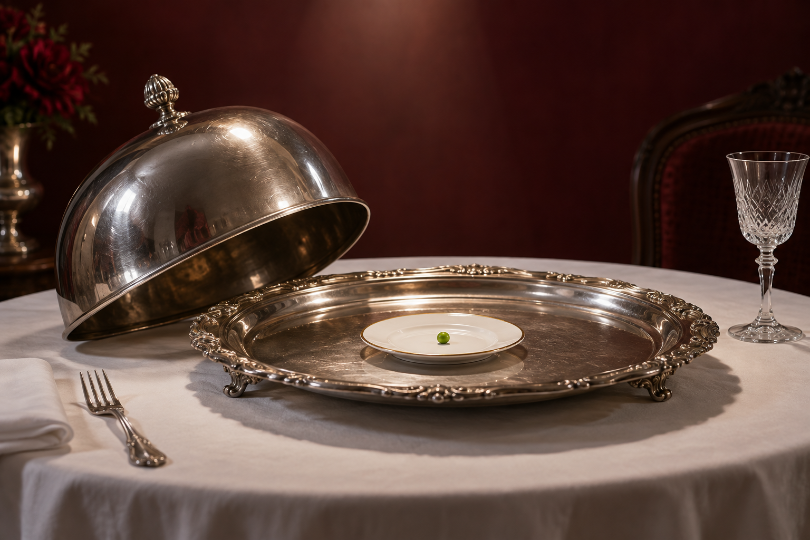
A silver serving dome arrives with the seriousness of a state occasion. The plate is enormous, the lighting is flattering, and someone has clearly gone to a great deal of trouble. Lift the dome and there is one pea. The joke depends on that first impression: the audience must expect a meal before it can enjoy being offered almost nothing.
An AI Video Generator can supply moving images for a scene like this, but the brief still needs to say what the audience should believe before the reveal. MakeShot accepts text descriptions and supports image-to-video creation. Those inputs give a filmmaker ways to explore the shot; they do not decide where the laugh belongs. That decision begins with the covered plate.
Establish the Promise Beneath the Serving Lid
Keep the opening plausible. A clean tablecloth, a carefully centred platter and a heavy silver dome already suggest ceremony. A spinning chandelier, dancing cutlery or a shower of glitter would tell us immediately that anything can happen. Then the pea becomes one more strange object in a scene that was strange from the start. The ordinary details make the small disappointment worth watching.
Write down the expectation in plain language: a substantial dinner is about to be served. Next, decide which visible details actually create it. The size of the covered platter helps. A slow approach can help. A second empty plate may introduce an unnecessary question about another diner. Remove props that need their own explanation, even when they make the frame look richer.
The same choice applies to the framing. If the pea will be tiny in the final shot, it still has to be visible on the screen where the video will appear. A beautiful wide view may make the reveal look like an empty plate. Try the composition at that viewing size before investing in more action. Comedy cannot depend on the viewer stopping to enlarge the punchline.
This is a good point to decide whether a prepared image would help. MakeShot can animate an uploaded image, so an original still can establish the relationship between dome, platter and table. Inspect the result for changes to the shape and size of the objects. If the scale relationship is already unclear in the still, movement has another problem to carry.
How to Generate the Reveal as a Separate Shot
A useful first brief describes one event: a serving dome rises to reveal a single pea on an otherwise empty dish. It can also specify the intended restrained framing and formal atmosphere. Avoid asking for a procession, a dramatic lift, a spinning pea and a disappointed guest in the same attempt. Each extra event gives the shot another way to lose its main subject.
There are two practical ways to build the reveal. A continuous shot lets the audience see that the pea really was under the dome within the scene. Separate covered and uncovered shots give the editor more freedom over the cut. The second approach may be easier to assemble, but the table, light and platter still need to feel like the same occasion. Otherwise the cut looks like a change of location.
When using an AI Video Generator for these candidates, describe the physical action separately from the intended audience response. A dome rising is an action. “Make it hilarious” is an ambition. MakeShot gives you a prompt-driven route to the former; judging the latter requires watching the result. Ask whether the object becomes visible cleanly before asking whether the scene feels funny.
Check the moving shot all the way through. Does the dome pass through the dish? Does the pea become a grape as the camera approaches? Does another serving appear behind it? Any of these changes can replace the planned joke with an accidental puzzle. A shorter usable section may be enough. If the reveal itself is unreadable, choose another candidate rather than trying to explain it with a caption.
A still of the uncovered dish is also a useful fallback. The movement can belong to the approach, with the final cut landing on the pea. That can feel deliberately deadpan. Choose it because the contrast works, rather than assuming that a moving punchline is automatically stronger than a still one.
Leave a Beat for the Mismatch to Register
Once the pea appears, the audience has two things to do: find it and compare it with the meal they expected. Cutting away at the instant of the reveal can interrupt that second step. Holding forever can turn an elegant surprise into a request for applause. The useful length depends on the composition and pace of the surrounding scene, so try the shot in its intended edit.
Make two assemblies from the same usable material in your video editor. In one, leave the uncovered plate visible a little longer. In the other, move on sooner. Keep the opening unchanged so the comparison turns on the pause after the reveal. This is an editing comparison you make yourself, not a testing feature inside the generation tool.
Sound can change what those versions mean. A grand flourish that stops at the reveal suggests one kind of joke; quiet room tone suggests another. First check whether the visual mismatch makes sense without either treatment. Then add sound that suits the piece. Do not use an exaggerated crash simply to cover a reveal that the framing has made difficult to see.
Be careful with a reaction shot. A guest looking at the plate can give the audience somewhere to put its disbelief. A prolonged display of outrage may overwhelm the modest absurdity of one pea. If a reaction merely announces that something funny has happened, remove it and watch the transition again. The plate might already have done enough.
Check What a New Viewer Thought Was Coming
Show the rough cut to someone who has not read the prompt. Avoid introducing it as “the pea joke,” which gives away both the object and its purpose. Ask what they expected under the lid, what they noticed when it lifted, and where their attention went next. Their answers can distinguish a weak premise from a reveal that was simply too small or too brief.
If they expected something ridiculous from the opening, simplify the ceremony. If they saw an empty plate, change the framing or visibility of the pea. If they understood the reveal but kept watching the background, remove that competing action. These are different revisions. Rewriting every part of the brief at once would make it harder to know which change helped.
You can return to MakeShot for another candidate when the needed change belongs inside the shot. If the problem is only the pause after the dome lifts, work with the material already available. A new generation introduces new details to inspect. Keep the useful performance when a simple edit can give the audience time to read it.
End the Scene Before a Second Joke Starts
The single pea is enough to carry a short piece when the serving ritual makes a convincing promise. Adding a tap-dancing carrot afterwards may produce another amusing image, but it also changes what this scene is about. Let the first gag finish before deciding whether the film needs another.
MakeShot is useful here for filmmakers and visual creators exploring candidate shots from a clear comic premise. It is less useful as a substitute for deciding what the audience should notice and when. Keep the reveal readable, preserve the pause that lets it land, and leave while that absurdly small dinner is still the thing we remember.