Disclaimer: This article is not intended to be a recommendation. The author is not responsible for any resulting actions of the company during your trading experience. The information provided in this article may not be accurate or up-to-date. Any trading or financial decision you make is your sole responsibility, and you must not rely on any information provided here. We do not provide any warranties regarding the information on this website and are not responsible for any losses or damages incurred as a result of trading or investing.

A business owner launches a polished new website on a Friday. By the following Friday, enquiries have slowed to a trickle and pages that used to sit on page one of Google are nowhere to be found. The design is fine. What changed is everything underneath it.
That’s the real risk with website redesign SEO. A new look is easy to approve, but every URL, heading and internal link that search engines learned over the years can change at the same time. Here’s how to plan a redesign so your rankings survive the move, with checks that suit Malaysian business sites.
Why Do Rankings Drop After a Website Redesign?
Rankings usually drop after a redesign because search engines suddenly find different URLs, missing content, weaker internal links or technical blocks. When old pages vanish without redirects, or a new layout strips out the text that earned the ranking, Google has to judge each page from scratch.
The usual culprits:
- Old URLs change or are deleted with no redirects
- Copy gets trimmed to make pages look cleaner, taking useful detail and keywords with it
- Title tags and headings are rewritten without checking what they ranked for
- A staging site’s “noindex” tag or robots.txt block goes live with the new site
- Pages get heavier from sliders, videos and scripts, so they load slower
- New navigation buries important pages deeper in the site
None of these are exotic. Most are simply things nobody was assigned to check.
Start With an Audit Before Any Design Work
Designers need a brief, and so does SEO. Before mockups are approved, collect three things.
1. A full list of current URLs
Crawl the existing site with a tool such as Screaming Frog, or export from your CMS. Save every URL with its title tag, H1, status code and canonical. This list becomes the base of your redirect map later.
2. A performance baseline
Pull queries, pages, clicks and average positions from Google Search Console, ideally covering a full year if your business is seasonal. Add organic sessions and conversions by page from your analytics. Without this baseline, you can’t tell afterwards whether a dip is normal or a real problem.
3. A shortlist of pages to protect
Sort pages by organic traffic, leads and backlinks. The top group should change as little as possible in URL, main copy and heading structure. A redesign should change how these pages look, not what they say or where they live.
A redesign priority list should begin with pages that already serve a measurable search demand.
Rankpage Case Study: How Rankpage Gave PMax Motor’s Categories and Guides Distinct Roles
Rankpage planned PMax Motor’s categories for shoppers and guides for visitors researching products. Keywords were mapped to category, product and guide pages, with relevant content, metadata and internal links connecting those destinations.
That creates a clear structure to preserve during a redesign. Instead of treating every URL as interchangeable, the team can protect the pages serving product searches and retain the links that move readers from research into shopping.
Ahrefs recorded “motor helmet” moving from position 8 on 16 July to 5 on 13 September 2026, and “electric scooter malaysia” from 20 on 20 July to 8 on 21 September. These are useful page-level baselines; they are not results from a documented redesign.
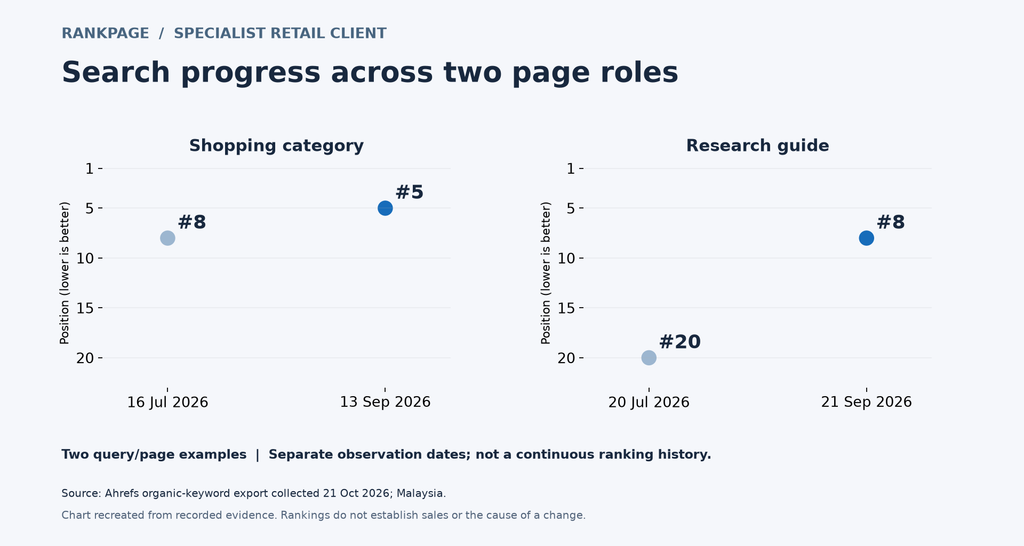
Figure: Separate ranking observations for a shopping category and a research guide.
Source: Rankpage client evidence: PMax Motor Ahrefs Malaysia keyword export, collected 21 October 2026.
Website Redesign SEO Checklist: Step by Step
To redesign a website without losing SEO rankings, audit and record the current site, map every old URL to a new one, keep high-performing content, build on a noindexed staging site, then launch with 301 redirects and an updated sitemap, and monitor Search Console closely.
- Crawl and document the current site.
- Record rankings, traffic and conversions.
- Decide which URLs stay, change or retire.
- Build a one-to-one redirect map.
- Keep titles, H1s and main copy on your best-performing pages.
- Build on a staging site that’s blocked from search engines.
- Test redirects, mobile layout, speed and structured data before launch.
- Launch, remove the staging block and submit the new sitemap.
- Monitor for at least a month and fix errors quickly.
Handle URLs and Redirects Carefully
The safest redesign keeps URLs exactly as they are. When that isn’t possible, say after a platform change or a restructure, every old URL needs a permanent 301 redirect to its closest match on the new site.
| Common mistake | Why it hurts | Better approach |
| Sending every old page to the homepage | Visitors land on an irrelevant page and Google sees a poor match | Redirect each page to its most relevant new page |
| Long redirect chains | Wastes crawl time and slows pages | Point old URLs straight to the final URL |
| Internal links still using old URLs | Adds needless redirect hops | Update internal links to the new URLs |
| Forgetting images and PDFs | Files that earned traffic and links start returning errors | Include them in the redirect map |
Update your canonical tags and XML sitemap at the same time, so they only list live, final URLs.
Keep the Content That Earned Your Rankings
Designers like white space. Search engines like substance. If a service page that ranks well gets cut from 900 words to 150 to fit a tidy layout, the ranking often follows the words out the door.
Keep the helpful text. If the layout needs to stay compact, expandable sections are generally fine as long as the text is in the page’s HTML. Keep internal links too: if your best blog post pointed readers to a service page, the new version should still do that.
Make the New Site Answer-Ready
A redesign is a rare chance to restructure pages, so plan for how people now find information: featured snippets, People Also Ask boxes, voice search and AI-generated summaries. Pages that win these spots tend to be organised around clear questions, short direct answers, lists, tables and schema markup that explains what the page is about.
Building that in from day one is what separates an SEO-friendly website redesign from a purely visual refresh. Rankpage’s page on answer engine optimisation covers how this kind of structuring works in practice. A few things you can do yourself:
- Put a one or two sentence answer directly under question-style headings
- Add an FAQ block to key service pages
- Use tables for comparisons and numbered lists for processes
- Check that structured data carries over to the new templates
Speed, Mobile and Technical Checks
- Mobile first. Google primarily indexes the mobile version of a page, so content hidden or missing on mobile counts against you.
- Page speed. Test templates in PageSpeed Insights and watch Core Web Vitals (LCP, INP and CLS). Oversized images and heavy sliders are the usual offenders.
- Language versions. If you serve English, Bahasa Malaysia or Chinese readers, keep hreflang tags and language URLs consistent so each version stays matched.
- Local details. Keep your business name, address and phone number identical across the site and your Google Business Profile.
- Tracking. Confirm analytics and Search Console verification carry over to the new site.
Launch Day and the First 30 Days
Before launch, remove the staging noindex tag, check robots.txt, spot-check a sample of redirects and confirm canonicals. After launch, submit the new sitemap, then watch the indexing report and 404 errors in Search Console. Compare against your baseline weekly.
Some movement in rankings during the first few weeks is normal while Google re-crawls everything. A sharp drop on a page you meant to protect is different: check redirects and noindex tags first.
One practical tip for Malaysian retailers: avoid launching right before a major sales period such as 11.11 or the festive season. If something breaks, you want time to fix it before traffic peaks.
When to Bring in an SEO Specialist
Sites with hundreds of pages, several languages or an online store get complicated quickly. Redirect maps and post-launch monitoring take real time, and fixing losses afterwards costs more than preventing them. Malaysia Rankpage is an SEO agency that works on both traditional search and AI search visibility, so it’s a reasonable place to start if you’d like an outside review of your redesign plan before the build begins.
FAQs
Will a website redesign hurt my SEO?
Not if it’s planned properly. Rankings fall when URLs, content or technical settings change without a plan. Keep your best pages and URLs stable, redirect everything that moves, and test before launch.
How long do rankings take to recover after a redesign?
It depends on the size of the site and how many errors slip through. Expect some fluctuation for a few weeks. If drops persist beyond that, look for broken redirects, missing content or indexing blocks.
Do I need 301 redirects if my URLs aren’t changing?
No. If every URL stays identical, no redirects are needed. You should still check that nothing has been accidentally removed or blocked.
Should I change design, platform and domain at the same time?
Avoid it where you can. Changing several things at once makes it hard to find the cause of a traffic drop. Separating the steps makes problems much easier to diagnose.
Can I keep my existing content on a new design?
Yes, and for pages that already rank, you usually should. Reuse the copy, headings and internal links, and improve them gradually after the site has settled.
Final Thoughts
Website redesign SEO comes down to preparation. Know what’s working, protect it, map every change and check the launch carefully. A redesign can improve both the look and the search performance of your site, as long as nobody treats SEO as something to sort out after go-live.
If you’re planning one, start with a crawl and a redirect map before the first mockup is approved. And if you’d like a second pair of eyes, ask an SEO specialist to review your plan first.