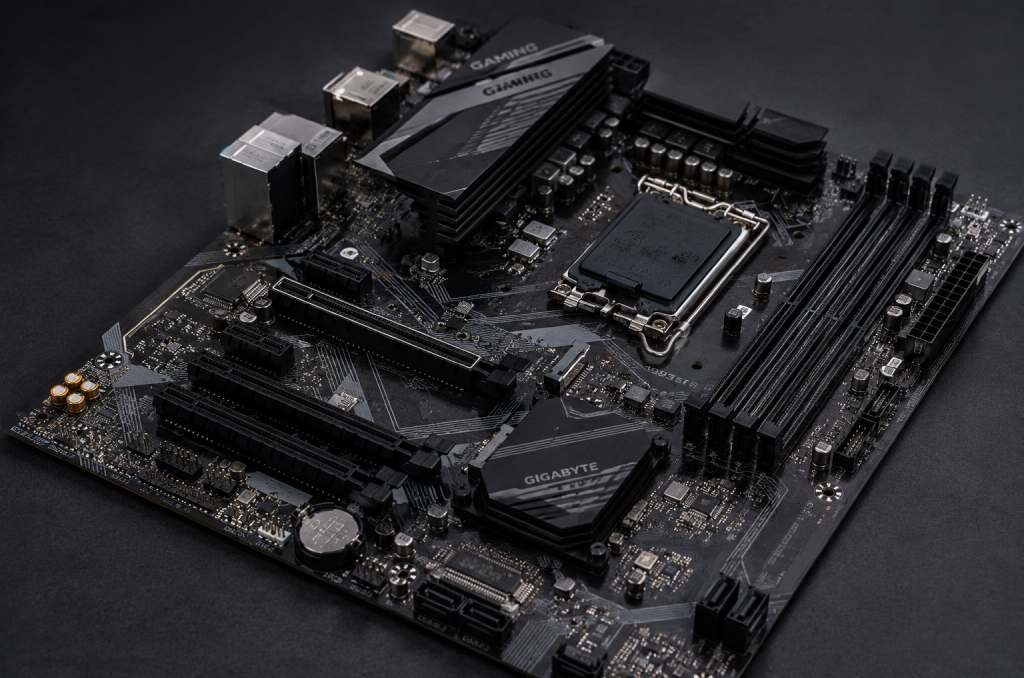
A motherboard is the main circuit board that connects all the parts of your computer so they can communicate with each other.
Getting the right mix of processor sockets, memory slots, and board size is the key secret when choosing the right motherboard for your personal computer. Let’s help you discover how to pick the perfect board for your needs without any confusion.
What Is a Motherboard and Why Does It Matter?
A motherboard is the central printed circuit board inside your computer. It acts like a giant power strip and communication hub, delivering power and sending signals between your processor, memory, storage, and graphics card.
Building or upgrading a computer can feel like a hard puzzle. You buy a fast chip, a shiny graphics card, and plenty of storage. But none of these parts can do anything on their own. They all need a home to plug into.
Think of a motherboard like a big family dining table. The processor sits at the head of the table. The memory and storage sit right next to it. The power supply brings food to everyone. If the table is too small or missing chairs, people cannot sit together.
If you pick the wrong board, your parts will not physically plug in. Your computer will not turn on. That is why learning basic compatibility is the first step for any beginner.
How Do You Know If Your CPU Fits Your Motherboard?
Your processor fits your motherboard only if both use the same socket type and chipset. You must match AMD processors with AMD sockets and Intel processors with Intel sockets.
The processor is the main brain of your computer. It drops directly into a special slot on the motherboard called the socket.
Sockets come in different shapes and pin setups. An Intel processor will not fit into an AMD socket. Even chips from the same brand might need different sockets if they were made in different years.
Matching Sockets and Chipsets
- AMD Sockets: Modern AMD processors often use sockets like AM4 or AM5.
- Intel Sockets: Modern Intel processors use sockets like LGA 1700 or LGA 1851.
- The Chipset: The chipset is a tiny helper chip on the board. It controls how fast data moves between parts. Always check the manufacturer’s box to see which processor generations the chipset supports.
If you try to force a chip into the wrong socket, you will bend tiny metal pins. That can break both parts forever.
What Motherboard Size Should You Buy?
Motherboards come in standard physical sizes called form factors. The three most common sizes are ATX, Micro-ATX, and Mini-ITX, and your choice depends on your computer case size.
Size matters when you build a computer. You want to make sure your board fits inside your metal case. You also want to make sure you have enough slots for future upgrades.
Here is a quick look at how the three main sizes compare:
| Board Size | Dimensions | Expansion Slots | Best Used For |
| ATX | 12 x 9.6 inches | 4 to 7 slots | Big cases, maximum upgrades, heavy gaming |
| Micro-ATX | 9.6 x 9.6 inches | 2 to 4 slots | Medium cases, budget builds, great balance |
| Mini-ITX | 6.7 x 6.7 inches | 1 slot | Small cases, compact desks, portable PCs |
A large ATX board gives you plenty of room to plug in extra sound cards, capture cards, or extra drives. A small Mini-ITX board saves space on your desk, but it is more difficult to build inside.
What Features Should You Look For in 2026?
Look for modern features like DDR5 memory support, PCIe 5.0 expansion slots, fast M.2 storage slots, built-in Wi-Fi, and plenty of USB ports for your daily devices.
Once you match your processor to your board size, you can pick the extra features you want.
Desktop PC sales remain steady as more people build custom computers for work and gaming. Picking modern features ensures your computer stays fast for years to come.
1. Memory Slots (RAM)
Your computer uses RAM to hold active apps. Most full-size boards have four slots, while small boards have two slots. Make sure your board supports the memory type you buy, such as DDR4 or newer DDR5.
2. Fast Storage Slots (M.2 NVMe)
Old hard drives used long cables. Modern storage sticks look like small gum sticks. They plug right into M.2 slots on the motherboard. Look for a board with at least two M.2 slots so you can add extra storage later.
3. Expansion Slots (PCIe)
Your graphics card plugs into a long slot called a PCIe slot. Newer boards feature PCIe 5.0 slots, which move data extremely fast. Demand for gaming hardware is driven heavily by faster data transfer standards.
4. Built-in Connectivity
Do you use a wired network cable, or do you need wireless internet? Some boards have built-in Wi-Fi chips. If you do not want to run an Ethernet cable across your room, buy a board with Wi-Fi in the name.
Simple Steps for Choosing Your Motherboard
Follow these easy steps when you are ready to shop:
- Pick your processor first: Choose your Intel or AMD chip before looking at motherboards.
- Check the socket name: Write down the exact socket type your chip requires.
- Pick your case size: Choose between a big tower and a small box for your desk.
- Set your budget: Spending more money gives you better audio, cooler designs, and extra ports, but budget boards run just as well for basic tasks.
- Use a PC part checker: Put your chosen parts into a free online compatibility checker tool to confirm everything works together.
Conclusion
Choosing a motherboard does not have to be scary.
Once you know that the motherboard is just a helpful bridge for your parts, the choices become simple. Match your processor socket, select the right size for your case, and pick the extra features you need for your daily routine.
Are you ready to build your dream PC? Start by listing your must-have parts today, and find the perfect motherboard!