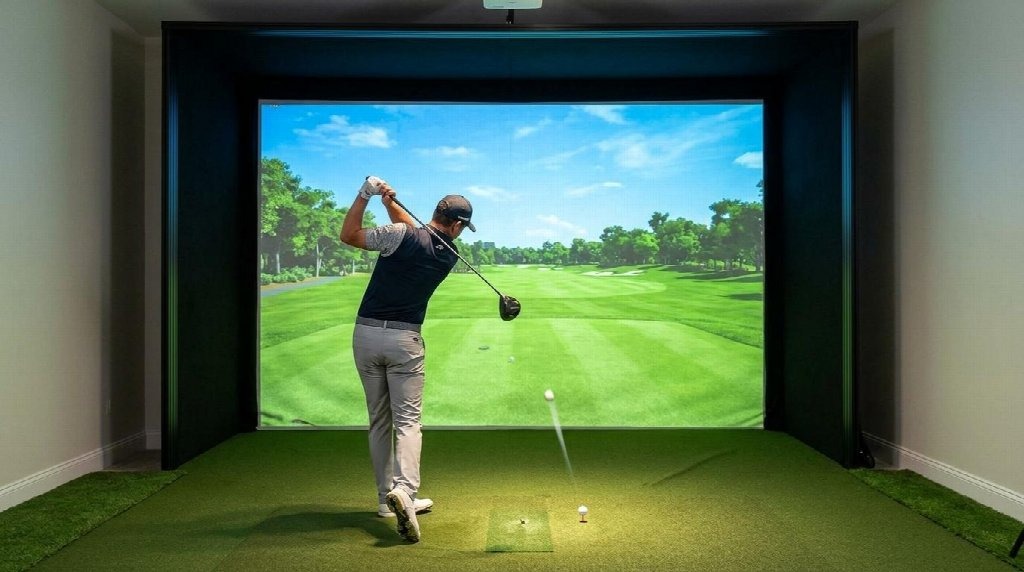
Most people building a home setup spend weeks agonising over the launch monitor, treating the screen as an afterthought. That is backwards. The screen is the one component you strike on every single shot, and a wrinkled, grainy or bouncy surface will undermine a five-figure monitor on every swing. Get the screen right and a modest setup looks professional. These are the seven best impact screens for golf simulators in 2026, ranked on what actually matters once the ball is flying.
What separates a good impact screen from a bad one
A purpose-built screen has to do five jobs at once: stop a ball moving at well over 100 mph, hold a sharp projected image, keep bounce-back to a safe minimum, dampen the impact noise, and survive thousands of full-speed strikes without tearing or sagging. A bedsheet or a standard projector screen fails at nearly all of them.
The dividing line is construction. Budget screens use a single loosely woven layer that produces a grainy picture and a sharp crack on impact. Premium screens use a triple-layer design, two tight-knit polyester faces with spacer yarns woven between them, so the middle layer absorbs energy rather than flinging the ball back. That construction is why the good screens are quieter, safer and last for years. If you plan to project onto it, weave tightness and layer count are the two specs to check first.
Ball speed is the other half of the equation. A strong swing puts far more force through the fabric than gentle practice does, so a screen rated only for casual use will not survive a session of full drivers. With that framework in mind, here are the picks.
1. GolfBays Pro+ Impact Screen
Best overall for durability and image quality
The Pro+ takes the top spot because it does the two hardest things at once: it survives brutal, repeated punishment and still throws a clean 4K-ready picture. Built for commercial academies and high-traffic bays, Golfbays engineers it around a proprietary fibre-bonded material that absorbs hundreds of thousands of full-speed shots, from a nervous chip to a flushed driver, while staying quiet on contact. That last part matters more than buyers expect; a screen this quiet is what makes a garage or spare room usable without annoying the rest of the house.
It is rated to take repeated strikes at ball speeds beyond 250mph, comfortably clear of even the 240mph-plus figures TrackMan has recorded from the fastest long-drive hitters, so no home swing is going to trouble it. Durability is only useful if the image justifies it, and here the Pro+ delivers. Fairways look lush, flags look reachable, and the high-resolution surface does justice to modern simulator software. It comes in more than 30 standard sizes, from a compact 2.30m panel up to a 9m commercial span, with free custom sizing on request, so awkward rooms are covered. Installation uses eyelets for secure mounting, there is a 12-month warranty, and UK buyers get free next-day delivery from the company’s Cheshire base. At £785 it is not the cheapest screen here, but it is the one PGA professionals specify and the one you are least likely to replace.
2. Carl’s Place Premium
Best for custom sizing and finishing options
Carl’s Place is the most established name in home simulator screens, and the reason to choose it is control. Carl’s Place offers more than 27 standard sizes across 1:1, 4:3, 16:10 and 16:9 ratios, plus fully custom dimensions down to the inch, all sewn in-house in Michigan. You also pick the material tier and the edge finish, whether that is classic grommets, loop-fastener strips for Velcro attachment, or flaps to hide an enclosure frame.
The Premium tier is the same triple-layer poly spacer build as the SIGPRO, tested through more than 14,000 shots with excellent durability. There is a high-contrast grey version for rooms with ambient light that costs only a little more than the white. Buyers report the Premium lasting five years or more under regular play at driver speeds of 150 to 165 mph, with the image still crisp. Prices range from roughly $440 to $1,120, depending on size. If your room has non-standard dimensions or you want a borderless turf-to-screen look, the Premium is the one to configure.
3. SIGPRO Premium
Best independently tested performance
If you want proof rather than marketing, the SIGPRO Premium has it. The screen from The Indoor Golf Shop’s SIGPRO range uses the same triple-layer poly spacer construction as the other premium options, with two heavy-duty polyester faces sandwiching vertical spacer yarns. What sets it apart is the testing behind it. In independent head-to-head testing by MyGolfSpy, it beat the leading competitor across image quality, sound, bounce-back, and durability, which is a rare thing to see backed by a third party rather than a brand’s own lab.
Practically, that translates to a smooth 4K image with no visible grain, minimal bleed-through, and low sag over time. It ships with double-stitched black vinyl edges, grommets, and a hook-and-loop perimeter for adding padding or netting later. Sizing runs from small square panels up to large 16:9 spans, with pricing from roughly $460 to just over $1,000 depending on dimensions. The main catch is lead time, which can stretch to a couple of months in busy periods.
4. Rain or Shine simDIY Premium
Best value premium screen for DIY builds
The simDIY is Rain or Shine Golf’s own screen, the same one used in their SwingBay enclosures, and it hits a sweet spot between price and performance. It uses a ballistics-grade woven polyester blend with a vinyl-coated border and 3/8-inch nickel grommets, ready to hang from a frame with bungees. The tight weave produces a bright, clean projection image without the grain you get from cheaper single-layer fabric.
It is rated for impacts up to 250 mph and, with correct tension, returns the ball to your feet with around five feet of bounce-back rather than firing it back at you. Five standard sizes cover the common 4:3 and 16:9 ratios, with custom sizes on request. It is a straightforward, well-priced choice for anyone piecing together a setup themselves rather than buying a full enclosure.
5. The Net Return Pro Series Flex
Best for quick swaps between practice and play
The Net Return’s Pro Series Flex screen is the no-frills option for people who want to switch between hitting into a net and projecting a course in under a minute. Designed to pair with the brand’s Pro Series net, the updated version adds corner grommets so bungees can hold it taut where the original simply hung from the top.
The white polyester takes full-speed drives, projects a bright image, and keeps bounce-back and puckering in check. Two things to note: the screen suits a 4:3 projection ratio because of its shape, so a 16:9 image leaves wide white margins, and it arrives folded, so a quick pass with a clothes iron or steamer sorts out the creases. For a compact space that doubles as a practice net, it is one of the more affordable routes in.
6. HomeCourse ProScreen 180
Best retractable screen for multi-use rooms
If the room has to go back to being a garage or living space between sessions, a retractable screen solves the problem that a fixed enclosure cannot. The HomeCourse ProScreen 180 uses a ballistic-grade screen on motorised arms that deploy in under 30 seconds by wireless remote, running on a rechargeable battery with no hardwired installation. It includes sky netting for ball containment and spans nearly 14 feet with the arms extended.
The screen measures roughly 8 feet tall by 10 feet 6 inches wide and needs about an 8-foot-6 ceiling. At around $1,500 to $2,000, it costs more than a fixed screen, but for a shared space that has to disappear on demand, that premium buys back the room. It handles real golf balls at full driver speed, so you are not sacrificing performance for flexibility.
7. Cimarron 10′ x 10′ Impact Screen
Best budget option
Simple and cheap, the Cimarron 10-by-10 punches above its price. Made from 100% commercial-grade polyester, it is flat and white enough for projector use yet thick and tough enough to double as an impact net or baffle. That versatility makes it a sensible first screen for a starter build or a garage setup where projection is not yet the priority.
The topstitched edges secure to any frame with a bungee or rope system, and it comfortably takes real balls at high speed. It will not match the image sharpness or noise dampening of a triple-layer premium screen, and heavy daily use will wear it faster, but as an entry point or a net-and-screen hybrid it is hard to fault for the money.
How to choose the right impact screen
Size and aspect ratio come first, because the screen and enclosure largely dictate the width and height of your whole setup. Choose the ratio based on your room width: a 16:9 screen wants a wider room, while 4:3 suits squarer spaces and is what most simulators default to. Measure the space before you fall for a spec sheet.
The white-versus-grey question trips a lot of people up. White reflects nearly all the projector’s light for the brightest possible image, which is ideal in a fully blacked-out room. Grey absorbs more ambient light for deeper blacks and better contrast where the room has windows or overhead lighting, at the cost of some brightness. This comes down to a property called gain: as ProjectorCentral explains in its guide to screen gain, a matte white screen sits around 1.0 while ambient-light-rejecting grey screens can drop to about 0.6. If your room cannot be made properly dark, grey plus a brighter projector usually wins.
Bounce-back is a safety issue, not a convenience one, and most bounce-back problems come from installation rather than the screen. Leave a gap of at least 12 inches behind a screen fixed on all sides, hang it with bungees rather than rigid fasteners, and resist the urge to tension it drum-tight. A correctly hung premium screen should return the ball only a foot or two, not fire it back at you.
Finally, think of the screen as one part of a wider kit. The right projector, enclosure and the smaller golf accessories that round out a home setup all affect how good the finished bay feels, and a simulator lets you keep your game sharp through a Yorkshire winter when the courses around Sheffield are waterlogged.
Frequently Asked Questions
What is a golf simulator impact screen?
A golf simulator impact screen is a reinforced fabric surface that receives your golf shots while displaying the projected course image at the same time. It is built to stop a full-speed ball safely, hold a sharp projection, and survive thousands of strikes. Ordinary projector screens and household fabrics cannot do any of this reliably.
How much does a good impact screen cost?
Budget single-layer screens start around $150, mid-tier screens run roughly $300 to $600, and premium triple-layer screens sit between about $450 and $1,100 or more, depending on size. The GolfBays Pro+ is priced at £785. Retractable systems are the most expensive, typically costing $1,500 and up, due to the motorised hardware.
White or grey screen, which is better?
White is better in a fully dark, light-controlled room because it produces the brightest, most vibrant image. Grey is better in any room with windows or ambient light because it absorbs stray light and deepens contrast. If you cannot fully black out the space, choose grey and pair it with a brighter projector.
How do I stop the ball bouncing back at me?
Leave at least 12 inches of clearance behind the screen so it can flex on impact, and hang it with bungee cords rather than rigid fixings. Avoid over-tensioning it, as a drum-tight screen behaves like a trampoline. A properly installed premium screen returns the ball only one to three feet.
How long does an impact screen last?
A premium triple-layer screen lasts three to five years or more with light use, and around one and a half to three years under heavy daily use. Budget single-layer screens can wear out within a season of regular full-speed play. Using clean balls and rotating the screen periodically extends its life significantly.
Can I use a regular projector screen instead?
No. A standard projector screen is not built to absorb impact, so it will tear quickly, bounce balls back dangerously, and produce loud strikes. Impact screens use multi-layer polyester specifically engineered to take repeated high-speed hits. It is not a cost-saving option.
What size impact screen do I need?
First, choose the size and aspect ratio based on your room width, then check that the ceiling height allows for a full swing. Most home setups land on a 4:3 screen roughly 8 to 10 feet wide, while wider rooms can take a 16:9 span. Many brands offer custom sizing for awkward spaces.
Why is my screen so loud on impact?
Loud strikes usually mean a single-layer screen, a screen tensioned too tightly, or too little gap behind it. Triple-layer poly spacer screens dampen sound far better because the middle layer absorbs energy. Loosening the tension and adding clearance behind the screen both help.
How far should I stand from the screen?
Ten to twelve feet from the hitting position to the screen is the practical standard for home setups. Standing closer increases bounce-back risk regardless of your launch monitor type. Camera-based monitors can sit closer to the ball, but the tee-to-screen distance should still respect that minimum.
How do I keep my impact screen clean?
Clean your golf balls before every session, because dirt and marker ink transfer onto the screen at impact speed and stain it permanently. For routine care, vacuum gently with a soft brush attachment, and spot-clean marks with a damp microfibre cloth and distilled water. Let it dry fully before the next session.
Whatever your budget, the screen deserves as much thought as the monitor in front of it. Match the size to your room, choose white or grey based on how much light you can control, and buy the sturdiest construction you can justify, because a screen that lasts five years is cheaper than three cheap ones. For most serious builds, the GolfBays Pro+ is the screen you buy once and forget about, which is exactly what you want from the surface you hit on every shot.