Disclaimer: This article is not intended to be a recommendation. The author is not responsible for any resulting actions of the company during your trading experience. The information provided in this article may not be accurate or up-to-date. Any trading or financial decision you make is your sole responsibility, and you must not rely on any information provided here. We do not provide any warranties regarding the information on this website and are not responsible for any losses or damages incurred as a result of trading or investing.
A growth, analytics or scheduling tool that asks for an Instagram password deserves immediate scrutiny. Passwordless access has become an expected signal of a more considered connection model—but it is not a safety certificate.
The important distinction is between sharing credentials and delegating authority. The first gives another party a powerful, reusable secret. The second can allow a tool to perform a defined task without receiving that secret. It can reduce password exposure, yet it says nothing by itself about privacy, platform compliance, data retention or whether a promised growth outcome is credible.
For creators, marketers and small businesses, the practical question is not simply “Does it need my password?” It is: how does it connect, what can it do, what does it actually do, and what evidence supports its claims?
Password sharing hands over the wrong level of control
A password is not merely a way to enter an account. It can enable the holder to act as the account owner. Meta has warned people not to give Facebook or Instagram passwords to third-party sites or apps except through official services or an authorised login flow. An unauthorised service with login credentials may gain broad access, potentially including the ability to view information or post as the user.
That remains true when a service describes itself as “organic”, managed or AI-led. Branding does not narrow what a password can unlock. It also creates a difficult dependency: if a provider stores, mishandles or exposes that password, changing it may become necessary across every place where it has been reused.
Delegated access aims to avoid this. You authenticate with the platform, approve a request, and a connected application receives authority for particular actions. The service should not need to see the password used to establish your identity.
Tokens and delegated authorisation, in plain English
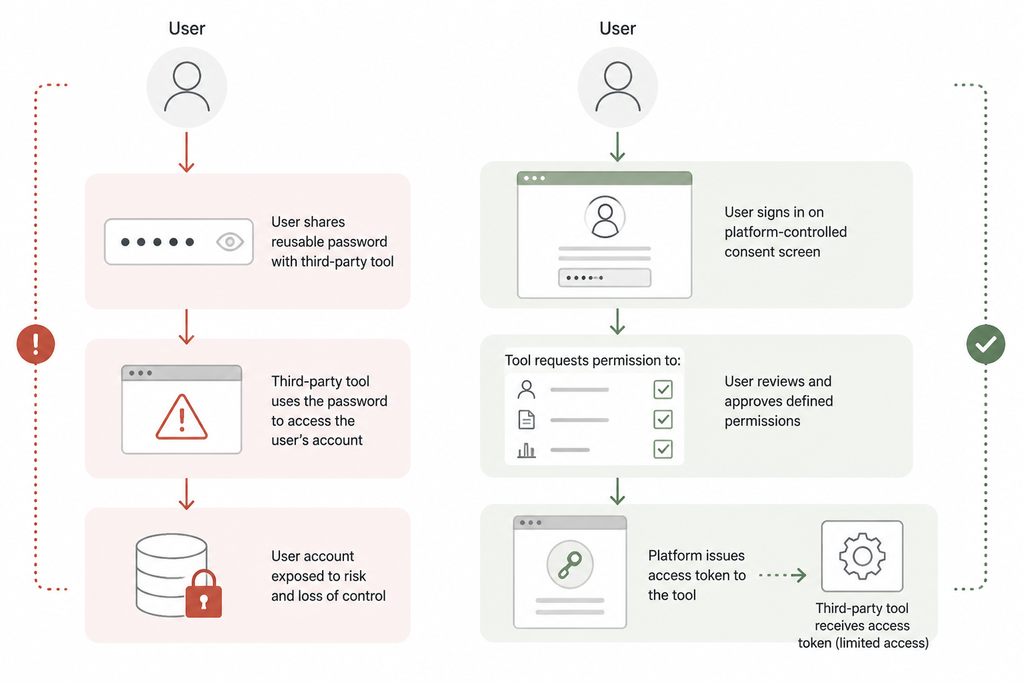
Delegated access can reduce password exposure, but the token and requested permissions still require scrutiny.
OAuth is a common pattern for delegated authorisation. In a typical version, a tool sends you to a platform-controlled sign-in and consent page. Once you approve the request, the tool receives an access token rather than your password.
An access token is a credential used by software to make authorised requests. It is closer to a visitor pass than a house key: it may be tied to particular permissions and can be managed separately from the account password. The analogy has limits. A token can still be valuable to an attacker, may grant more access than expected, and must be handled securely by both the platform and the provider.
Meta’s documented Instagram API uses tokens for API calls and describes functions including publishing, insights and comment management for eligible professional accounts, subject to the relevant permissions. Its current Instagram API documentation is the right place to check the product-specific requirements before connecting a tool, because account eligibility, permissions and available features can change.
Not every passwordless service uses OAuth, an official Meta API or minimal permissions. A browser extension, a session-based process or another indirect method may avoid displaying a password form while still creating material access or privacy risks. “No password required” should therefore start a conversation about the mechanism, not end it.
What official Instagram access is designed to support
For the Facebook Login route described in Meta’s cited documentation, the documented API is intended for Instagram professional accounts—Business and Creator accounts—not consumer accounts. The listed permission model includes examples such as basic account access, content publishing, comment management, page-list access and page engagement data.
This provides a useful proportionality test. The access requested should make sense for the job:
- A caption assistant, content planner or engagement calculator may not need account access at all.
- A publishing tool may need an appropriate publishing permission, but not access to private conversations.
- An analytics platform may reasonably need account and insights data, but not publishing capability.
- A comment-management service may need comment-related access, provided its role and controls are clear.
A successful connection does not prove that every feature is available, appropriate or approved for a particular account. It also does not establish that the provider uses the resulting data well. Check the current Meta documentation and the provider’s explanation rather than relying on an old setup guide or a reassuring label.
The four-part legitimacy test
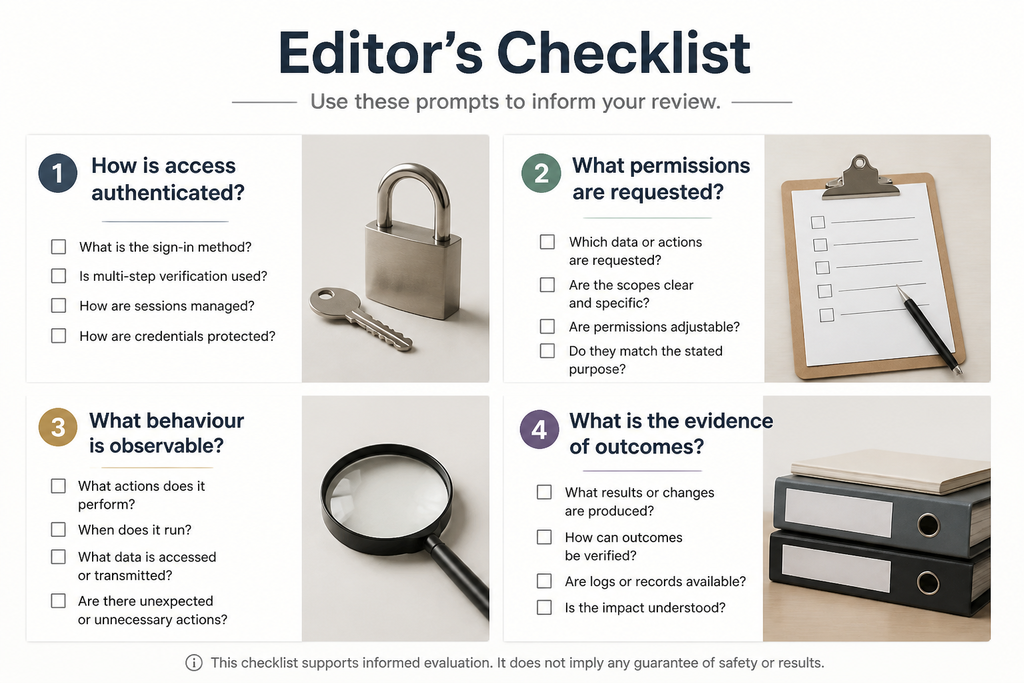
Assess the connection, permissions, behaviour and evidence separately; no single signal proves legitimacy.
Assess an Instagram-connected tool across four separate criteria.
1. Authentication method
Look at where authentication takes place. An official, platform-controlled login and consent flow is materially different from an embedded form that asks for Instagram credentials. Check the web address before signing in; do not proceed if the destination is unclear or the provider asks you to send a password through chat, email or a support ticket.
This test concerns credential exposure. It does not prove that the provider is privacy-conscious, compliant with platform rules or effective at growth.
2. Requested permissions
Read the consent request instead of approving it automatically. For each permission, ask: what function needs this, and would the tool still work with less access? A scheduler asking to publish may be understandable; an analytics dashboard asking to publish needs an explanation.
The UK National Cyber Security Centre notes that third-party applications may be able to read or modify some or all user data, and that it can be difficult to know exactly what has happened once data has been accessed. Broad permissions are not automatically malicious, but they increase the importance of a convincing purpose, trustworthy developer and clear privacy information.
3. Observable behaviour
Judge a service by its actions after connection. Planning posts, reporting on performance and publishing approved content are different activities from sending direct messages, following accounts, liking posts or posting repeated comments in an account’s name.
Ask whether actions need human approval, whether you can set boundaries, and whether you can stop the service promptly. A legitimate-looking login process does not make every subsequent behaviour acceptable.
4. Evidence of outcomes
Treat promises of guaranteed followers, instant engagement or automated audience-building as claims to investigate, not proof. Ask what changes in practice: content workflow, reporting, publishing, outreach or interactions? Then ask what evidence shows that the work is useful for your particular objective.
Security, privacy, platform compliance and effectiveness are distinct tests. A tool can pass one and fail another.
Compare tools by activity, not marketing language
| Tool category | Typical connection need | Main questions |
|—|—|—|
| Calculators, planners and caption tools | Often none | What information is collected and where is it stored? |
| Official scheduling or publishing tools | Defined publishing access may be needed | Is access proportionate, and is publishing controlled? |
| Analytics platforms | Account and insights access may be needed | Which data is collected, retained or exported? |
| Comment-management tools | Comment-related permissions may be needed | Can rules be reviewed, paused and overridden? |
| Follow, like, comment or DM automation | May seek broad or indirect access | How are actions carried out, and does the activity create platform risk? |
No category is automatically safe, private, compliant or effective. But a narrowly defined workflow is easier to inspect. The more a service acts outwardly as you, the more carefully its methods deserve to be examined.
Artificial engagement creates a separate risk
Password safety and platform compliance overlap, but they are not the same issue. A tool may never ask for a password and still use artificial engagement or unofficial automation. Equally, a tool with an official connection can request more data than is appropriate for its purpose.
Meta has documented enforcement action against specific services it said used bots or automation to inflate Instagram likes and followers. That demonstrates an enforcement direction against the artificial inflation described in those cases; it does not mean every service marketed for growth is prohibited or that every account will be treated in the same way.
For readers considering paid-audience tactics, this guide to the legal considerations around buying Instagram followers in the UK offers useful context. Legal questions, platform requirements, account security and audience quality should be assessed independently rather than reduced to one “safe” label.
What “no password” does not prove
A passwordless claim does not prove that a provider:
- uses OAuth or an official Meta API;
- requests only the minimum permissions;
- protects tokens and account data appropriately;
- has a suitable retention or deletion practice;
- avoids unofficial browser-based methods;
- follows applicable platform requirements; or
- produces genuine, useful growth.
It does establish a reasonable expectation: the provider should be able to explain its access model plainly. Avoid services that evade questions about permissions, rush you through a connection, rely on a suspicious login page or make outcomes sound inevitable.
A pre-connection checklist for UK users
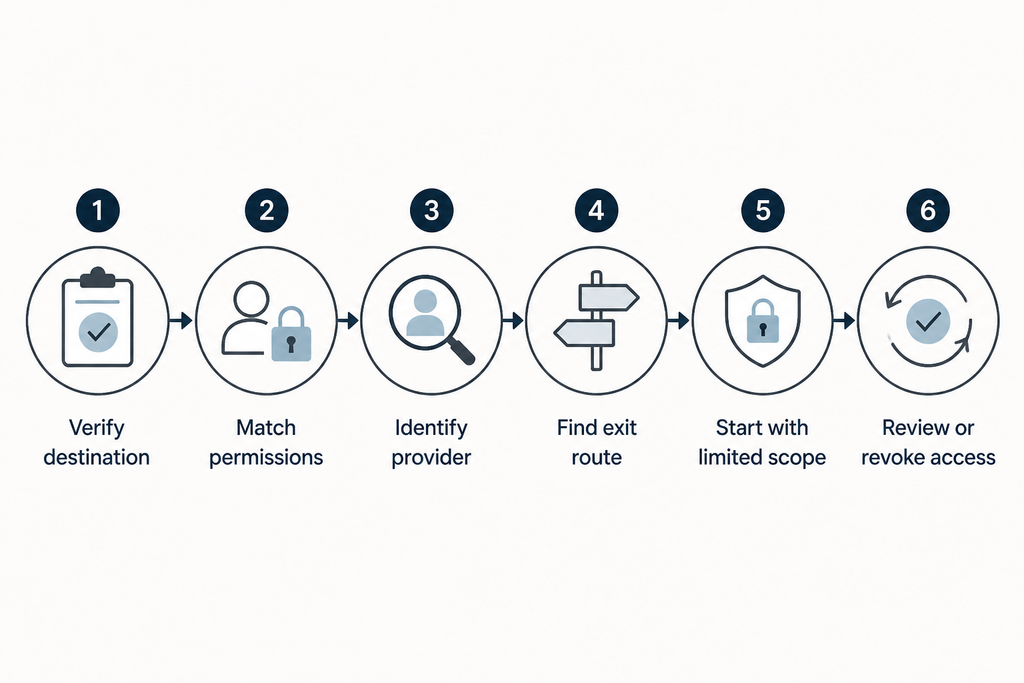
Treat access as an ongoing control: inspect it before connection and review it afterwards.
Before connecting an account, check the following.
- Verify the sign-in destination. Authenticate only through a recognisable platform-controlled page; never enter an Instagram password into a provider’s own form.
- Match access to function. Compare every requested permission with the feature you intend to use.
- Identify the provider. Look for a real business identity, working support route, privacy information and a clear account of how data is used.
- Assess its security record. Consider the developer’s reputation, update history, disclosed incidents and the impact if the service were insecure.
- Find the exit route first. Before approving, establish how to disconnect the tool, request deletion where appropriate and contact support.
- Challenge big promises. Ask for a description of the work performed rather than accepting vague assurances about growth.
- Start proportionately. If practical, test the smallest sensible scope of access before granting broader permissions.
After connecting: review, revoke and strengthen access
Review connected services regularly, especially after a campaign, staff change or abandoned trial. Use Instagram or Meta’s current account settings for connected applications and websites to inspect and remove access; labels and navigation can vary by account type and product, so follow the platform’s current in-product guidance rather than depending on a fixed menu path.
Revoking access is an important control, but it should not be assumed to erase data a provider already collected or to answer every question about issued tokens. Read the provider’s retention and deletion policy, and ask for clarification if it is vague.
Use a unique password for the account and enable two-step verification. Where available, consider passkeys: the NCSC recommends them over passwords and explains that they are resistant to phishing because they cannot be intercepted, reused or stolen in the same way as passwords. This strengthens account sign-in, but does not replace careful permission review.
If you have already shared a password with a third party, change it promptly, review active sessions and connected applications, and enable stronger authentication. If you suspect compromise, use official platform support channels rather than a link supplied in an unsolicited message.
Judge the connection—and the conduct
“No password required” can reduce direct exposure of an account’s most powerful credential. It is not proof of security, privacy, compliant behaviour or meaningful results.
The practical standard is to assess authentication, permissions, observable behaviour and evidence separately. For broader context on evaluating growth approaches without mistaking shortcuts for guarantees, Brecktic’s growth resources can be a useful starting point. The slogan matters far less than what a provider is authorised to do, what it actually does afterwards, and whether you remain in control.
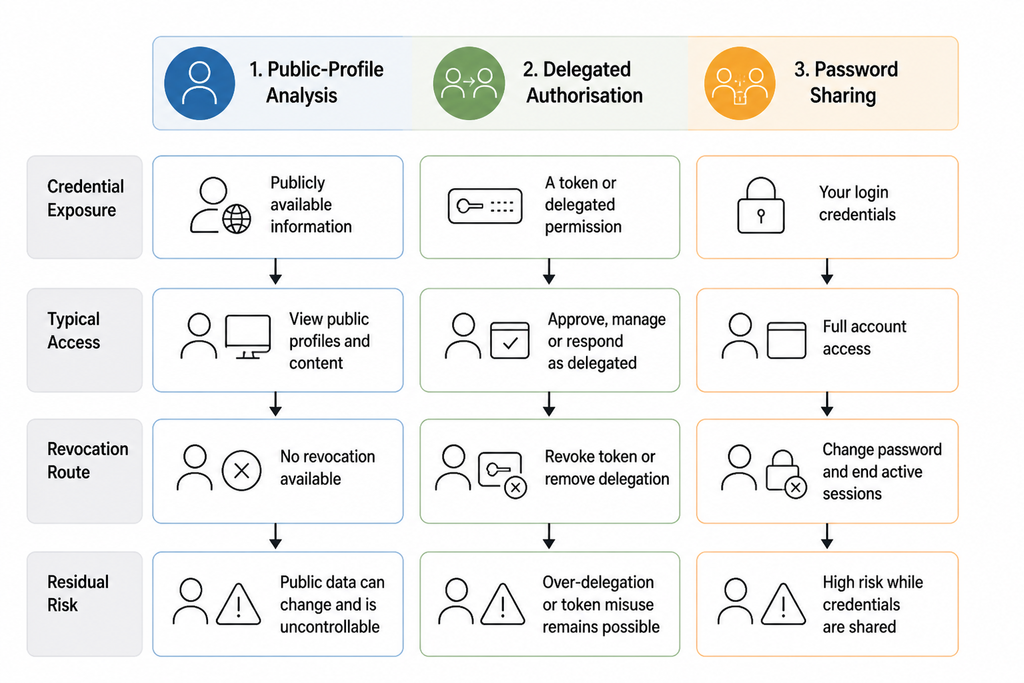
Different access models expose different credentials and grant different levels of control.
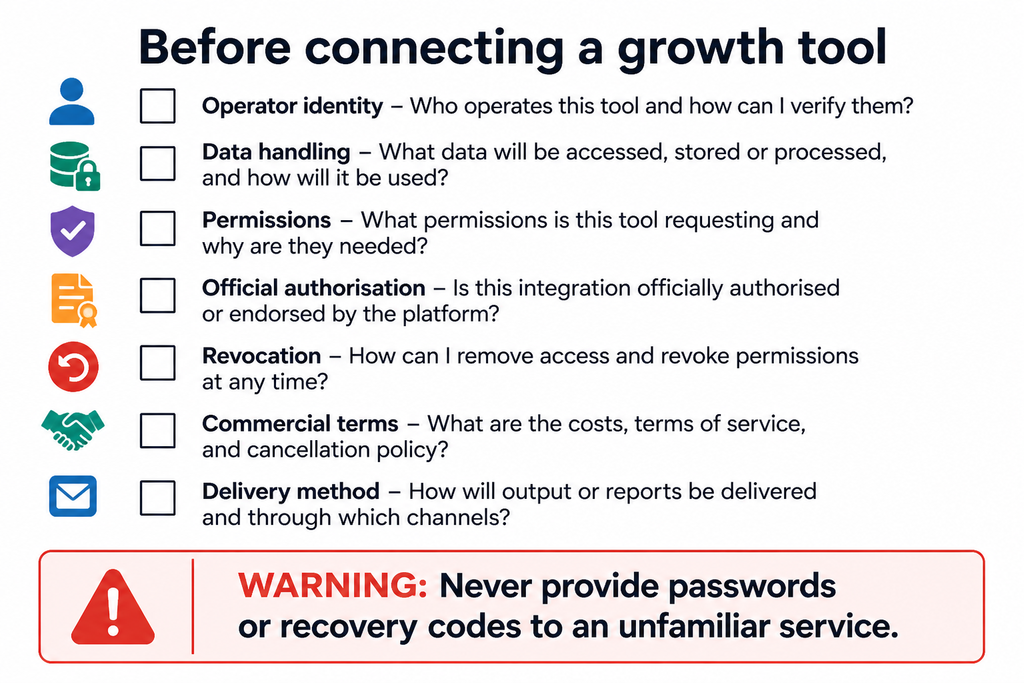
A short audit can expose unnecessary access, unclear data practices and weak off-switches before connection.
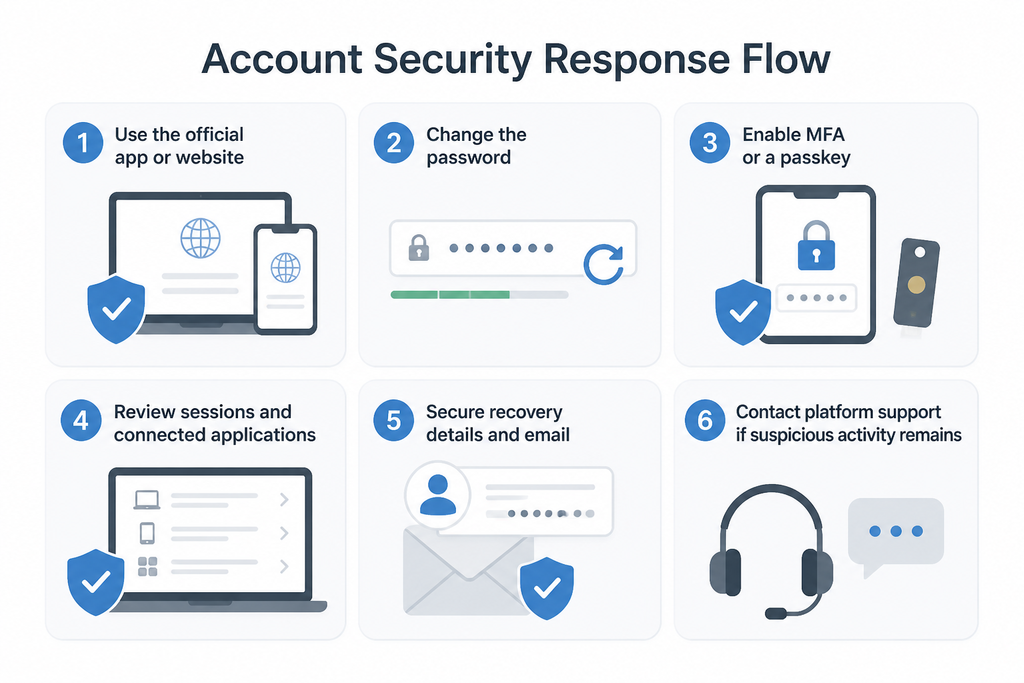
Act promptly through the platform’s recognised security and support channels.