Disclaimer: This article is not intended to be a recommendation. The author is not responsible for any resulting actions of the company during your trading experience. The information provided in this article may not be accurate or up-to-date. Any trading or financial decision you make is your sole responsibility, and you must not rely on any information provided here. We do not provide any warranties regarding the information on this website and are not responsible for any losses or damages incurred as a result of trading or investing.
Independent film scenes grow through proximity. A writer meets a director at a screening, a photographer knows a workable location, and a small crew finds a way to turn a local story into moving images. The same closeness can make a production nimble, but it also means there is rarely a department dedicated to cleaning up every handoff.
For that kind of project, AI screenwriting software should protect the writer’s source material before it tries to add more. The interesting question is not how much text a model can produce. It is whether the screenplay, its structure, and the production decisions around it can stay connected as the film changes shape.

Automatic Screenplay Formatting Should Stay Quiet
Screenplay format carries meaning. A scene heading is not simply a bold line. A character cue is not ordinary text pushed toward the middle of the page. Readers scan those elements to understand place, speaker, action, and pace. When the format breaks, the crew spends attention decoding the page instead of imagining the scene.
Typed Nodes Preserve More Than Margins
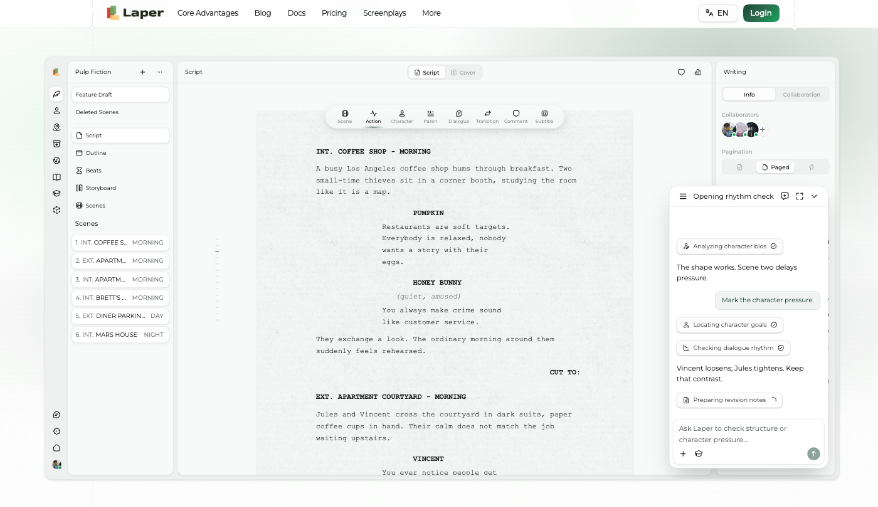
The platform stores scene headings, action, character cues, dialogue, parentheticals, and transitions as typed elements. The editor applies layout and pagination while the writer works. Because the element type survives, the same page can support scene navigation, targeted AI reads, comments, collaboration, and structured export.
The distinction becomes clear when a draft moves between tools. Plain text can resemble a screenplay while leaving the next system to guess where scenes begin. Typed content carries an identity for each block. PDF and Final Draft XML export are handled as part of the document lifecycle rather than as a browser printout, although no tool can promise identical private behavior in every third-party application.
A sensible export check uses a difficult page from the middle of the film: a new scene heading, two speakers, a parenthetical, and a transition. Open the result in the receiving workflow and compare element types, not just appearance. If dialogue only looks centered but arrives as ordinary text, the handoff is not finished.
The Writer Still Owns The Language
Automatic formatting is useful because it is uncreative. It places dialogue and transitions correctly without treating that permission as a reason to rewrite them. Laper makes text changes explicit rather than continuously “improving” lines in the background. That boundary matters for a film whose voice comes from a particular place, community, or rhythm of speech.
The writer can therefore use informal phrasing, dialect, silence, or an awkward interruption without fighting an automatic polish layer. The software can keep the block recognizable as dialogue while leaving the choice of language alone. A local voice survives because structure and style are treated as different jobs.
| Software should automate | The filmmaker should decide |
| Element layout and pagination | What belongs on the page |
| Scene order from headings | Why one scene follows another |
| Character records from cues | Which relationships matter |
| Stable task and asset history | Which image defines the film |
Structure Views Help A Small Crew See More
A screenplay is designed to be read from top to bottom. Production questions cut across it. Which scenes share a location? Which character vanishes for twenty pages? Has a planned beat earned a scene? Which sequence is ready for a storyboard? A useful structure view answers those questions without declaring itself a second script.
Scene Headings Provide The Reliable Facts
In Laper, the top-to-bottom order of scene-heading nodes is authoritative for scene order. The location portion contributes location entities. Character cues feed the character layer. Beats and props live beside the screenplay as planning objects because their creative meaning should not be inferred automatically.
This is a stronger role for screenplay writing AI than producing a generic new scene on demand. An assistant can inspect the outline, locate a weak stretch, and request the scenes that carry the problem. The writer sees the evidence and can decide whether to cut, move, or rewrite. Diagnosis comes before generation.
A concrete test is to inspect the middle of the film after one scene moves. The scene list should follow the new page order. A planned beat that no longer has a scene should remain visible as a planning question, not be silently treated as completed. That difference tells the team which facts are derived and which choices still need authorship.
Different Lenses Can Share One Project
A writer may spend the day in dialogue while a director looks at scenes and shots. A producer may care about locations and assets. Laper’s project state supports those different views around the same draft. Collaboration does not force every role into the editor; it reduces the chance that each role invents its own source.
Character boards, relationship graphs, and casting views follow the same principle. Character cues establish who appears, then the team can enrich profiles and explicitly maintain relationships. The graph does not announce that every pair sharing a scene has a meaningful bond. People decide which connections matter.
Visual Development Needs A Named Source
An independent project may explore a character portrait, a difficult location, or a rough storyboard long before a full production design budget exists. Generative tools can help with that conversation, but only when the image can be traced back to the thing it was meant to explore.
Generate Where The Context Already Lives
Laper starts visual generation from a character, location, prop, scene, shot, or relevant tool panel. A generation request becomes a durable task, and successful outputs become assets associated with the project. The Assets view gathers results and history; it is not a context-free button that guesses what the team meant.
The practical benefit appears when an idea is rejected. The crew can retain task history without leaving the rejected picture attached as the current character or location reference. Exploration remains available, but the selected production direction stays legible.
Keep Every Storyboard Inside A Real Scene
A storyboard shot belongs inside a scene scope. The selected scene text, referenced characters, existing shot order, neighboring frames when continuity requires them, and explicit camera settings can inform the request. The resulting board is still a directorial interpretation. If the page changes, the board must be reviewed rather than treated as an authority over the script.
A simple test keeps the work honest: can somebody new to the project open the visual and identify the current scene, subject, and decision it supports? If not, the file is mood-board material. It may be inspiring, but it is not yet a production handoff.
Keep Local Voice Inside The Production Workflow
Film made close to home often succeeds because it notices details a distant production would smooth away. Software should not sand off those details in the name of assistance. It should handle format, expose structure, and keep references attached so the creators can make better-informed choices.
Laper is best suited to writers and small crews who want one screenplay to support both revision and early production thinking. It will not supply local knowledge, direct an actor, or decide what a place means. The crew still owns those choices; the software keeps their working material connected.